Mind & Code Builders Workshop
Thursday 19 November16 seats
Live on Zoom with John Mac Nova
Think like a builder. Build your first app with AI in one evening.
In 1 hour and 45 minutes we build a real web app together, on your own screen. I'll show you how I work with Claude, the tools I use every day, and how one small app turns into the next thing you want to make.
Live, with your camera on
Build along on your own laptop
My real workflow
No coding background needed
Save my seat · $77
Thu 19 Nov, 19:00–20:45 CET · Max 16 builders
1 PM ET / 10 AM PT
Stay 30 minutes. If it's not for you, I'll refund you in full.
Builders WorkshopEnds 20:45
34d 00h 00m
until we start building
19:00Welcome and setup check
19:10Build: agenda, countdown, Next
19:40Add the dial and the finish line
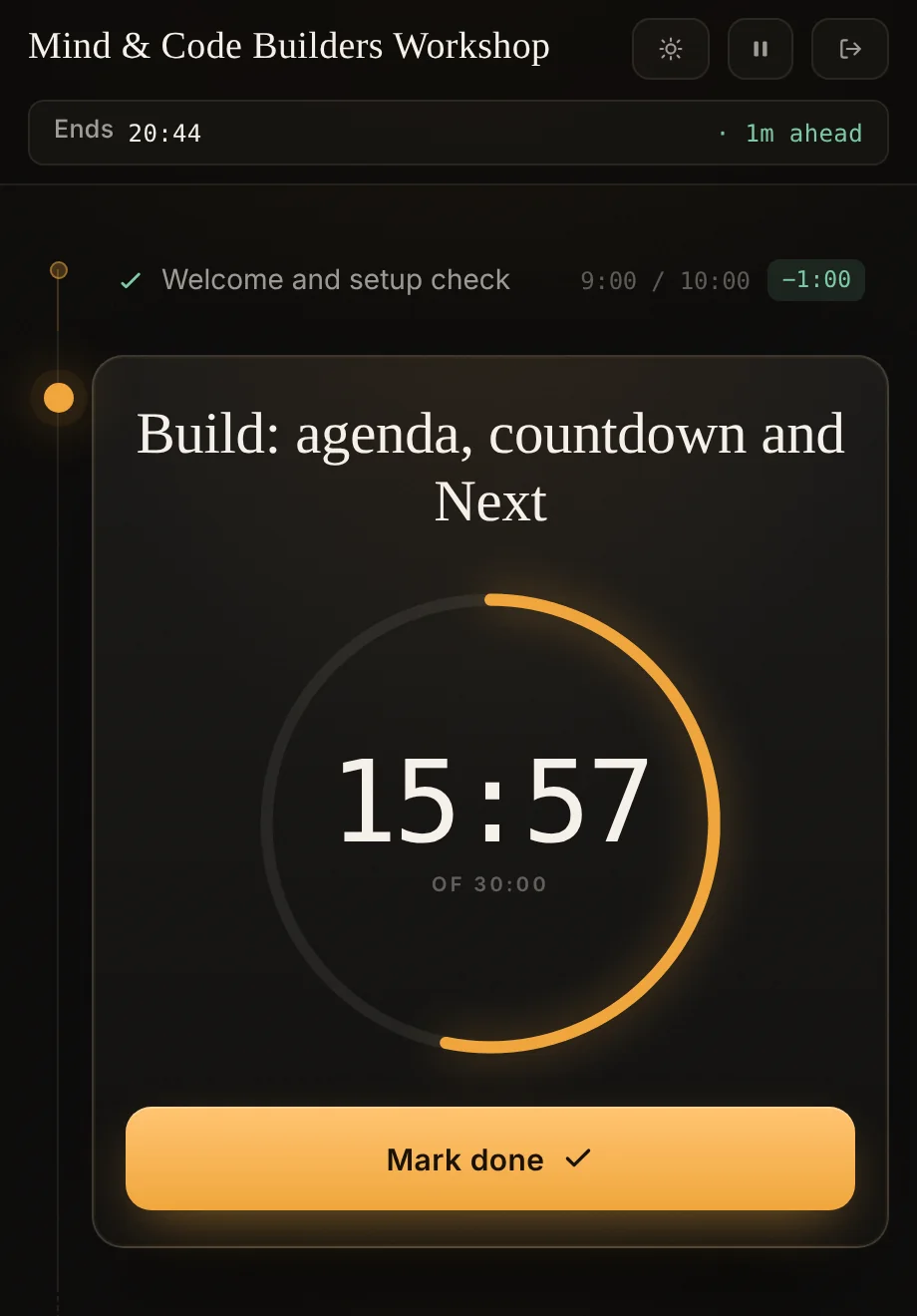
You build this exact dial with me on 19 November
AI writes the code now. Somebody still has to know what to build.
 Claude
 Codex
 Grok
 Gemini
 Cursor
You probably have a list of ideas: a tool for your clients, a better way to run your own business, an app you keep wishing existed. A year ago most of them needed a developer, a budget and a lot of waiting.
Today you can describe what you want in plain words, and Claude writes it. What decides whether you end up with something that works is how you think while you build: what to ask for first, how to test it, what to do when it breaks. That's the builder's mindset, and it's what I'll teach you, live, while we make something real.
always know when you'll finish
the dial you'll build
press Enter for the next item
What we build together: the Webinar Timer
A few weeks ago I built a small app to keep my own Zoom meetings and workshops on time. You list your talking points with the minutes you want for each. A dial counts down the item you're on, and you press Enter when you move to the next one. A line at the top tells you when you'll actually finish, like "Ends 20:04 · 3m ahead".
In the workshop we build the core of it together, one step at a time, on your own screen. You leave with a working app in your browser that you made.
Where it can go next
After the build I'll show you my full version and where an app like this can grow. Once you've built one, you start seeing the same pattern in your own ideas.
A phone app
A small Mac window above your slides
A workout timer or a class planner
You also leave with
8 steps, one loop
The Mind & Code Cheatsheet
A one-page map of the Builder's Loop, my eight-step workflow. Keep it next to your screen and follow it until you don't need it anymore.
My tool stack
The tools on my machine right now, what each one is for, and what I ignore.
The Prompt Pack
My prompts, ready to point at your own project.
How the 1 hour and 45 minutes runs
Most of the time you're building, and I'm right there on Zoom with you. With 16 people max, I can help when someone gets stuck.
Can't make it live? The replay waits for you in the members area for 30 days.
- 19:00Welcome, the Mind & Code way of working, and a quick setup check10 min
- 19:10We build the Webinar Timer together: the agenda, the countdown and the Next button30 min
- 19:40We add the dial and the "you'll finish at" line30 min
- 20:10I show my full version, where it can go next, and answer your questions25 min
- 20:35What's next: your replay, the resources and the 4-week Builders Cohort10 min
Why it's called Mind & Code
The code part has become the easy part. The results come from the mind part.
AI writes the code in seconds. The mind part is knowing what you want, thinking out loud with the machine, and staying calm when something breaks at midnight. I think out loud with Claude. I ask, I look at what comes back, I adjust, and I keep going. That loop is the whole method, and it works the same whether you're building a timer, a client portal or your own business tools.
For me it also connects to something bigger. When you build your own tools instead of renting them, you depend less on platforms, agencies and other people's timelines, and your data stays where you choose to keep it. That's the kind of freedom I've been building toward since I stopped working for anyone else, and it's why this workshop is made for free-thinkers and independent creators.
Building like this also changes how you see things. When an idea turns into a working tool in one evening, you start noticing how much of your own reality you can shape. That awareness is the Mind in Mind & Code.
Who this workshop is for
It's for you if
- You run your own business, or want to, and you'd rather build your own tools than wait for someone else to.
- You have ideas for apps or tools, and no technical background.
- You're a coach, creator or consultant who wants to show up with something you made. Or build tools that stay private, on your machine.
- You learn best by doing, with someone showing you their real screen and a workflow that doesn't get messy.
It's probably not for you if
- You want to become a professional developer and learn programming languages properly. A coding course will serve you better.
- You want someone to build the app for you. In this room, you build it.

John Mac Nova
Founder of Mind & Code | Web Designer & AI Engineer
Choice of tools and tech-stack

Astro

Svelte

TailwindCSS

Swift

GitHub

WordPress
Who's hosting
I'm John Mac Nova. I build things for a living, and I taught myself how.
Building since 2001Shopify Expert & Partner17 years of Taekwon-DoTravel-based, works from coffee shops
I've run my own business since 2001, mostly building custom websites for clients who couldn't afford to get it wrong. I'm a Shopify Expert and Partner. I learned by shipping things, getting some of them wrong, and fixing them in public.
The big change came when I stopped treating the computer as a tool I had to master and started thinking out loud with it. Since then I've built websites, a mobile app, my own macOS apps, a stack of WordPress plugins and web apps this way, all on the $20 Claude Pro plan. I follow the same eight steps every time, a workflow I call the Builder's Loop. I write less code than I ever have, and I ship more. That's what this session is about.
I'll share my actual screen the whole time.
"Having been John's Partner Manager at Shopify, I can attest to the high quality of work he produces for his clients and how vital he has been to our growth, not only in Norway but in the rest of the Nordics as well."

Amanda Marochko
Partnerships & International Growth EMEA, Shopify
"John has helped us build a sophisticated and flexible solution. It's now 10x faster than a year ago."
Tom Morkes, CEO Insurgent Publishing, co-founder of Infostack.io
"I love John's eye for detail and the designs he creates from the outlines I give him. It gives me such pleasure every time I go to my summit website."
Philippa Gillstrom, Mindset Mentor & Community Builder
Your seat in the Builders Workshop
What you get
- 1 hour 45 minutes live on Zoom with me, max 16 builders
- Your own Webinar Timer, built on your screen
- My tool stack, the Prompt Pack and the Mind & Code Cheatsheet
- The replay in the members area, for 30 days
- $77 off the 4-week Builders Cohort if you join within 7 days ($613 instead of $690)
Thu 19 Nov, 19:00–20:45 CET
$77
Save my seat · $77Stay for the first 30 minutes. If it's not for you, tell me and I'll refund the full $77.
16 seats. When they're taken, the next date opens on the waitlist.
The 30-minute guarantee
Stay for the first 30 minutes. If it's not for you, tell me and I'll refund the full $77. No forms, no questions, no hard feelings.
No coding background needed
Built for beginners. We go one step at a time, and nothing is assumed.
Only 16 seats
Small enough that I can help when you get stuck, live, on your own screen.
Replay for 30 days
Miss a step or want to redo it later? The recording waits in the members area.
Questions worth asking
I've never written a line of code. Is this for me?
Yes. We don't learn programming syntax. You learn how to describe what you want and work with Claude until it exists. If you can explain an idea to a friend, you can do this.
What do I need?
A laptop and a Claude Pro plan ($20 a month). Everything I've built, from websites to a mobile app and WordPress plugins, runs on Pro. You don't need the $100+ Max plans. You'll also install the free Claude desktop app, which has a browser built in, so you can see your app working as we build. After you book, I'll send a short checklist so you're set up before we start.
What if I can't make it live?
You get the replay in the members area for 30 days. Join live if you can, though. Building along with the group is where it clicks.
What time is it where I live?
Thursday 19 November, 19:00–20:45 CET. That's 1 PM in New York and 10 AM in Los Angeles. The calendar invite you get after booking shows your local time.
What if it's not for me?
Stay for the first 30 minutes. If it's not for you, tell me and I'll refund the full $77.
What happens after I pay?
You get a receipt and an email with the Zoom link, a calendar invite and the setup checklist. The day before, I send a reminder with the link again.
What's the 4-week Builders Cohort?
My program where you build your own project from idea to working product over four live sessions. Workshop attendees get the $77 back as a discount if they join within 7 days. See the cohort
Thursday 19 November. 16 seats.
Bring an idea, or just your laptop. By 20:45 you'll have a working app you built yourself, and a way of working you can use on the next one.
Save my seat · $7730-minute money-back guarantee
Save your seat for Thursday 19 November
When
19:00–20:45 CET
1 PM ET / 10 AM PT
Where
Live on Zoom
Capped at 16 builders
You get your own Webinar Timer, the tool stack, the Prompt Pack and the Cheatsheet, plus the replay in the members area for 30 days.
Join the waitlist for the next session
The 19 November seats are taken or the session has started. Leave your name and email and you'll hear first when the next Builders Workshop opens.
Pay $77 and save my seat
Secure checkout with Stripe. Takes about a minute. 30-minute money-back guarantee.
Not yet, take me back